AI motion design
Titles that slide, data bars that grow, 3D objects that spin: ClipOnIt animates your message as motion design, synced to the voice, without After Effects.
Free: 3 videos a month with a watermark · 24 visual styles, plus your own
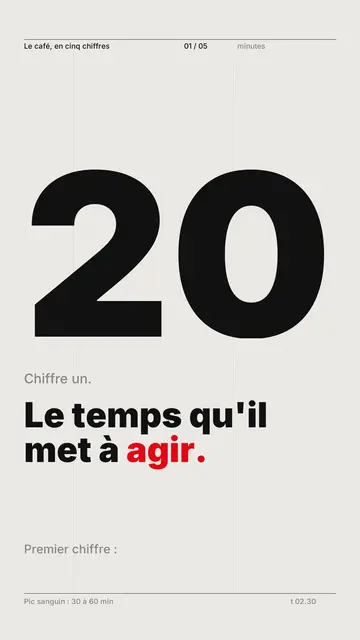
Motion design without a timeline
Motion design usually takes hours of keyframes for a few seconds of animation. Here the timeline is the narration: each key word triggers a move, a figure that grows, a bar that fills, an object that comes in. You describe what you want to say, AI decides what moves and when.
Three styles fit it especially well. Swiss grid, for strict typography and data. Wireframe, for neon 3D technical objects. Retro synthwave, for an 80s mood. If your brand already has guidelines, import your own style and the next videos follow it.
How to do it in 3 steps
- Write the message
One idea per sentence, with the figures you want to highlight.
- Pick the style
Swiss grid, Wireframe or Retro synthwave, or your own imported style.
- Export
Check the pace scene by scene, then render the vertical MP4.
What people use it for
- Announcement with numbersA result, a funding round, a milestone, with the figure up big.
- Launch teaserThree lines and a countdown before a release.
- Technical explanationHow an engine, a chip or a network works, in 3D objects.
- RankingA commented top 5, bar by bar.
- Account lookA series of videos with the same look, to be recognised in the feed.
Recommended styles
Swiss grid
Swiss typography in motion, giant figures and data bars: editorial motion design.
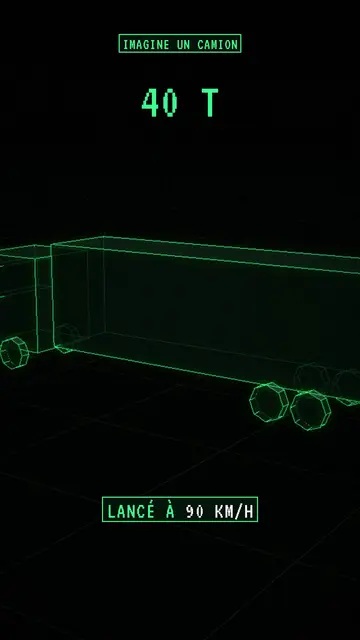
Wireframe
Neon-green wireframe 3D objects on a grid floor, for engineering and orders of magnitude.
- Free
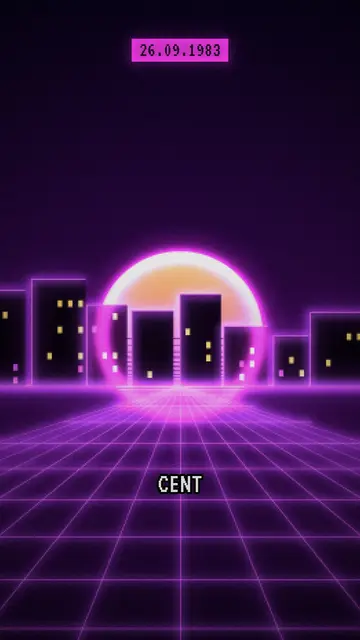
Retro synthwave
Purple-magenta pixel art, striped sun and neon grid, for pop culture. Included in the free plan.
Frequently asked questions
Format, voice, pricing: the short answers.
Can I change a specific animation?
Yes: move, hide or lock an element by hand, or ask the AI Director (paid plans) for “the figure earlier” or “one more bar”.
Can I export to After Effects?
No, the output is a finished MP4, ready to post. If you want to retouch the video, import it like any clip into your editing software.
My brand colours?
Import your own style: 2 styles on Starter, 5 on Pro, 20 on Business. Built-in styles keep their own colours.
How long?
The length follows the narration. For motion design on social media, 20 to 45 seconds is often enough.
Is it free?
Yes, to start: the free plan gives 3 videos a month with a ClipOnIt watermark, in 8 styles (Pixel News, Press paper, Comedy cartoon, Class sketch, Night tale, Social screen, Retro synthwave, Flat vector), no credit card. Starter ($29/month): 15 watermark-free videos, all 24 styles plus your own, your own voice and the AI Director. Pro $49: 30 videos. Business $149: 100 videos and 3 seats.
Other ways to make a video
- Explainer video maker
- Animated explainer video
- Text to video animation
- Whiteboard video maker
- Audio to animated video
- Educational video maker
- SaaS product video
- Faceless video maker
- Script to video
- TikTok explainer video
- Infographic video maker
- News video maker
- Animated story video
- Explainer videos for business
- All tools
Your video, in this style
Write one sentence: the style is already picked when you reach the editor.